LYRICAL GLASS
Lyrics in sight. Eyes on the show.
Beyond Chorus puts the current line on supported AI and XR glasses, so you can follow the song without looking down at your phone.
Real footage · Zurich 2026 · tap for sound
A real look through XREAL glasses.
Read the video description
Lyrics appear through the glasses over concert imagery on a room screen. A setup shot shows the connected device, cable, and glasses. David moves the glasses away from the camera, then brings the lens back into view. The filmed lyric line changes, and the video ends with a link to the setup page. The music is not needed to understand the setup shown.
We commissioned this footage from David. It shows XREAL glasses and Nebula at home, with concert imagery playing on a screen — not a live concert recording. The lyrics, reflections, and camera blur are part of the original footage.
Before you connect
- Check your device and glasses setup. For direct USB-C output, your device must support video over USB-C (DisplayPort Alt Mode).
- Use a video-capable cable, then open Beyond Chorus on the connected device.
- Start a song or join a LiveSync show. Follow the setup guide for your device and adjust the lyric view as needed.
This Nebula demonstration is one setup. Positioning and display behavior vary by device; it does not mean every phone provides the same anchored view.
Check the XREAL setup guideLook for AUGE XR AG as the developer. If the app name looks different, read about our name change.
How it works
Connect your glasses and start a song.
Connect your glasses
Connect XREAL Air, Rokid Max, or TCL RayNeo with a video-capable USB-C cable. For Even Realities G2 or Meta Ray-Ban Display, follow the pairing guide for your glasses.
Play a song
Recognise recorded music playing nearby, choose a song from a concert setlist, or join a LiveSync show.
See lyrics in your view
Read the current lyric on your glasses. The layout depends on the display.
Why glasses
Your phone stays in your pocket. The words stay in front of you.
Phone Away
Keep the phone in your pocket and read the current lyric in your field of view.
Recognises Recorded Music
ShazamKit listens for recorded music from streaming, radio, or vinyl. Live recognition depends on the room and the performance.
Adaptive Typography
The display adjusts its contrast and type size for the surrounding light.
Sub-180ms Sync
Lyrics are aligned with sub-180ms display latency, keeping the current line close to the vocal.
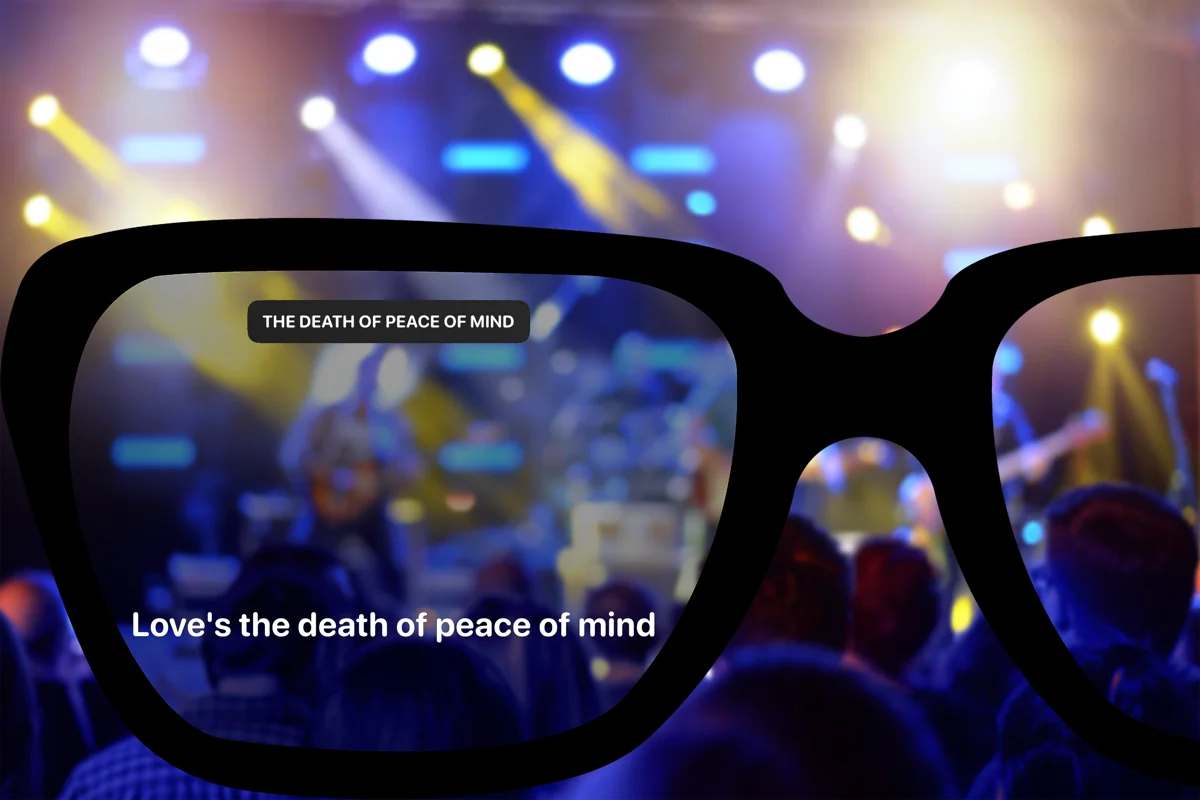
Heads-up display
What you see through the lens.

Real concert · lyrics in view
See the current lyric and song name while you watch the stage. Use your phone to change the song or timing.
Device guides
Find the setup for your glasses.
Check your model for pairing instructions, phone requirements, and the lyric view it supports.
Even Realities G2
Read the current line and the next one. Your phone handles the music recognition and lyrics.
XREAL
Connect over USB-C to see lyrics and LiveSync effects on the glasses.
Meta Ray-Ban Display
Set up the web app in Meta AI or request a native beta invitation.
Apple Vision Pro
A native visionOS app with a lyric panel you place in the room.