LYRICAL DRIVE
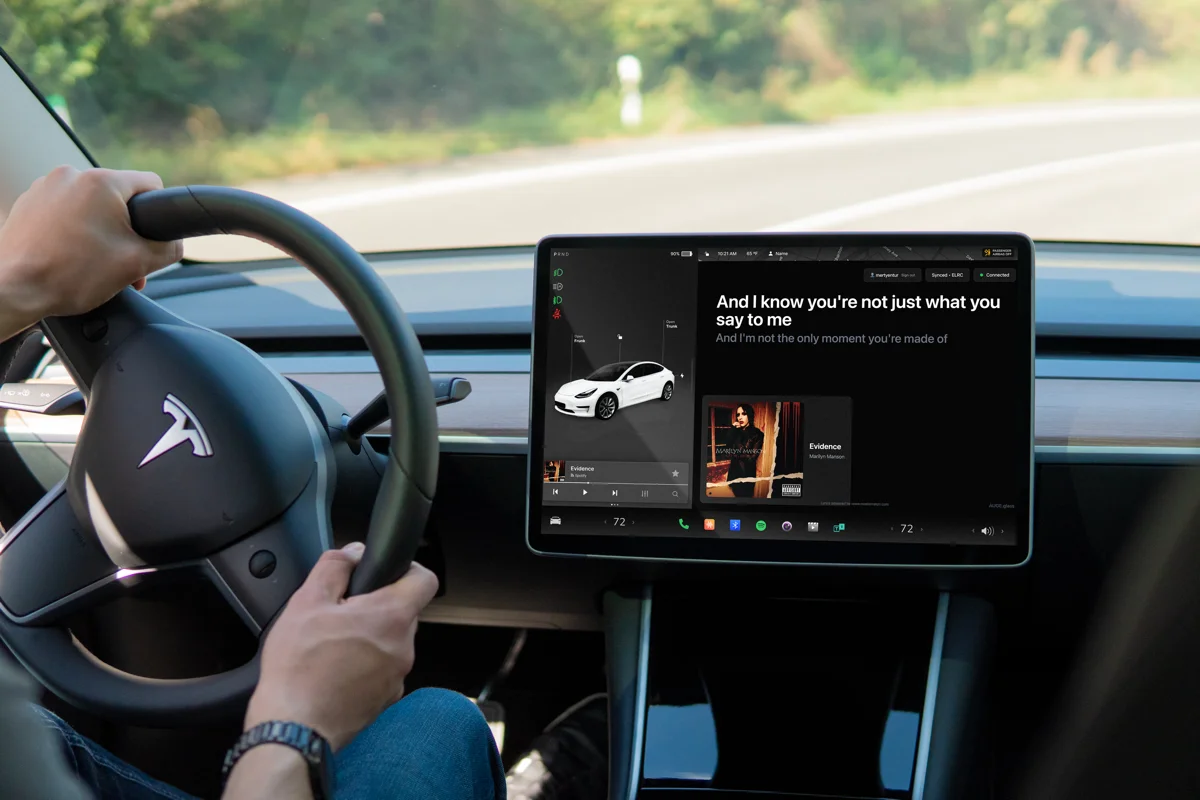
Time-synced lyrics on your car display.
Use CarPlay, free phone pairing, or new phoneless Tesla lyrics with Pro. Connect Tesla once with iPhone or Android, then let the car bring the words.
Getting connected
Connect your phone to the car screen.
Tesla lyrics with your phone are still free. Pro adds the new phoneless option. Keep Beyond Chorus running on your phone for free lyrics on the Tesla screen.
Phone-Paired
Open car-lyric.com in the car browser and pair it with Beyond Chorus on your iPhone. The phone recognises the song and sends each lyric to the screen.
- Enable Beyond Chorus Drive in the app
- Open car-lyric.com in the car browser
- Lyrics appear automatically
NEW · BEYOND CHORUS PRO
Tesla phoneless lyrics
Connect Tesla once in Beyond Chorus on iPhone or Android. Then follow the music directly in the car browser, without phone listening or a running phone app.
Open car-lyric.com/tesla while parked. Scan the QR, link Tesla in the app, and confirm the matching code.
Explore phoneless TeslaIn the car
For the passenger seat. Or a parked car.
Passenger Display
Large, high-contrast lyrics give the passenger a clear view without handling the phone.
Cars with a browser
Open car-lyric.com in a compatible car browser, then pair your phone.
Real-Time Sync
Your iPhone sends each lyric to the car screen in time with the song.
Recognition on iPhone
Beyond Chorus recognises music playing in the car, including streaming services, radio, and Bluetooth audio.
Driving a Tesla? Read the Tesla setup guide for step-by-step instructions.
For passenger use or while parked
Beyond Chorus Drive is designed for passengers or use while parked. The driver must not interact with, read, or be distracted by the lyrics display while operating a vehicle. Always keep your eyes on the road. By using Beyond Chorus Drive, you agree that you are responsible for safe vehicle operation.
Get Beyond Chorus
Bring the lyrics to the passenger seat.
Get the phone app, then open car-lyric.com in the car browser to connect.